
Screenshots


App details
- Updated
- May 27, 2010
- Requires
- For Windows 7
- Language
- Spanish 7 moreLanguagesSpanishEnglishPor...
- Category
- Mobile
SoftPas in:
This product is also available in the following languages:
About Windows7 Black Transparent
Download Windows7 Black Transparent – Windows 7 theme, dark theme, transparent windows, elegant desktop, black interface, modern desktop design
Overview
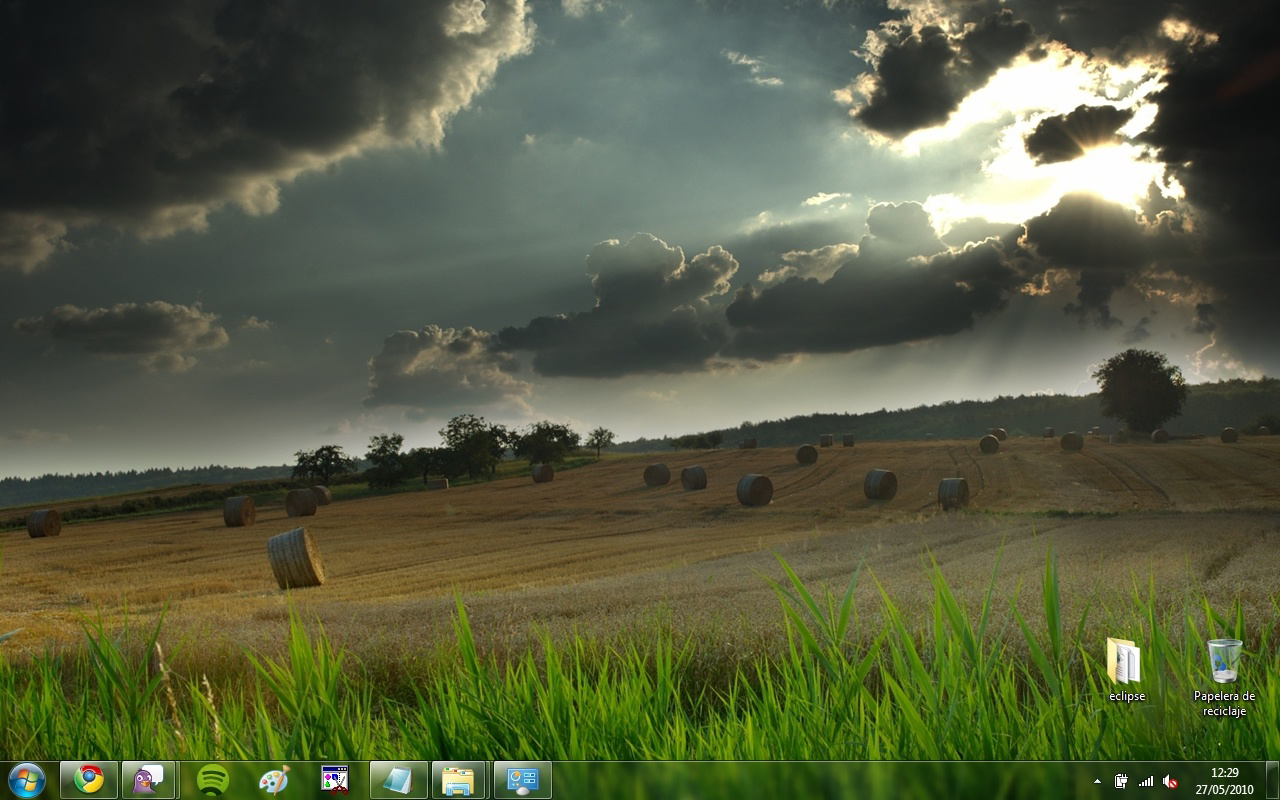
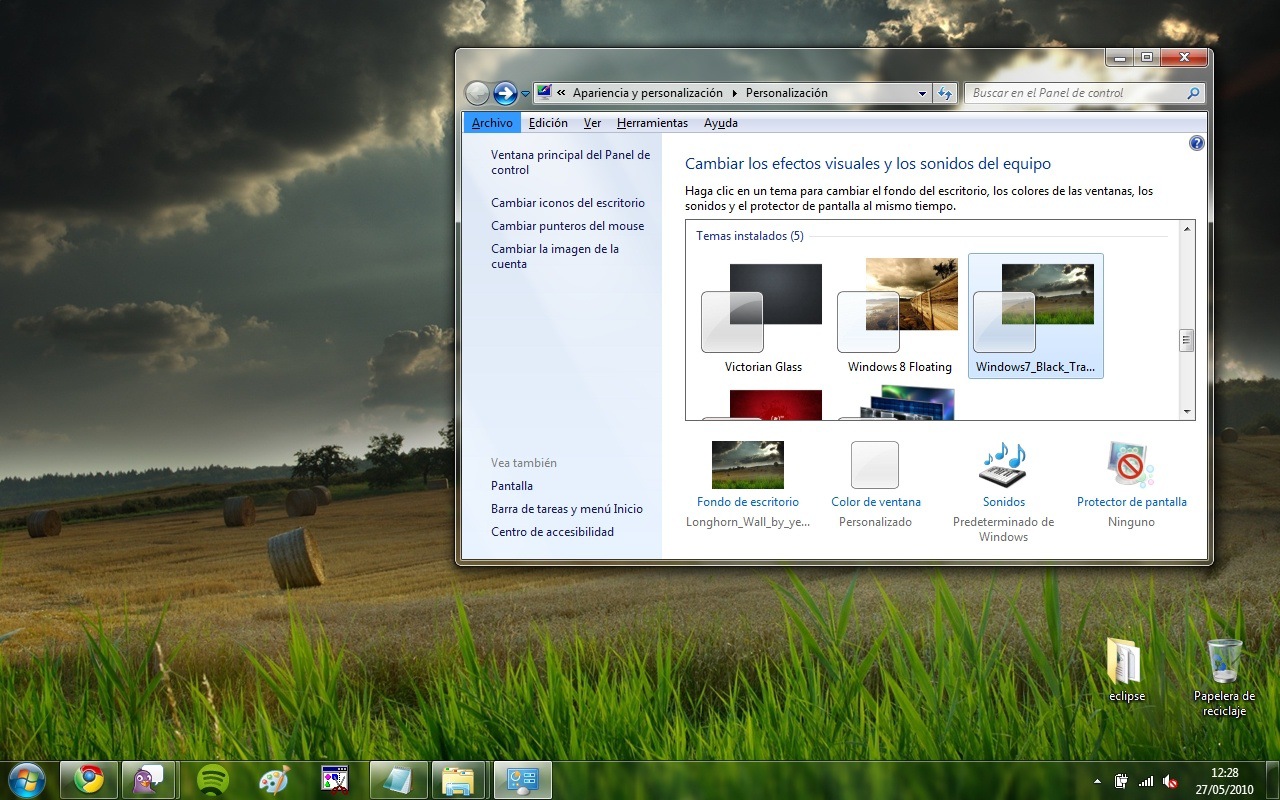
Windows7 Black Transparent is a desktop customization theme designed to transform the default interface of Windows 7 into a sleek, modern, and visually striking environment. By replacing the standard blue color scheme with a refined black and dark tone palette, the theme offers users a sophisticated alternative that emphasizes elegance and depth. Its core innovation lies in the implementation of transparent window frames, allowing users to glimpse their desktop wallpaper through active windows—a feature that enhances visual continuity and adds a sense of spatial layering to the desktop experience.
Targeted primarily at users seeking a personalized and visually immersive computing environment, this theme appeals to individuals who value aesthetics without sacrificing functionality. It is especially suitable for those who prefer low-light interfaces to reduce eye strain or who enjoy a minimalist, contemporary look. The theme also includes a high-resolution desktop background that harmonizes with the dark color scheme, ensuring visual consistency across the entire desktop.
Developed by Jason K. Menard, the theme was released on May 27, 2010, marking a notable entry in the early wave of Windows 7 customization tools. Though the developer did not provide additional technical details, the theme’s enduring relevance underscores its effectiveness in delivering a polished user experience. In the broader context of desktop personalization, Windows7 Black Transparent remains a recognized example of how subtle interface changes can significantly impact user satisfaction and visual engagement.
Key Features & Functionality
- Elegant Dark Colors: The theme replaces the default blue interface with a cohesive dark palette, offering a modern and professional appearance. This color shift reduces visual clutter and creates a more focused workspace, ideal for users who prefer a subdued and refined digital environment.
- Transparent Windows: By applying transparency to window frames, the theme allows users to see the desktop background through open applications. This feature enhances visual depth, making multitasking more intuitive and the interface feel more dynamic and immersive.
- Custom Title Bar: The redesigned title bar integrates seamlessly with the dark aesthetic, featuring clean lines and a minimalist layout. It maintains readability while contributing to the theme’s overall sophistication, ensuring that window management remains both functional and stylish.
- High-Quality Desktop Background: A dedicated, high-resolution wallpaper is included to complement the theme’s visual language. The background is carefully crafted to align with the dark color scheme, ensuring a consistent and polished look across the entire desktop.
- User-Friendly Installation: The setup process is designed to be accessible to users of all technical levels. Simple instructions are available on the official website, enabling quick deployment without requiring advanced system knowledge or third-party tools.
Real-world use cases include home office setups, creative workspaces, and personal computers where visual appeal and comfort are prioritized. Users can install the theme to refresh their daily computing experience, making their desktop feel more personalized and professional.
Interface, UX & Performance
The interface of Windows7 Black Transparent is defined by its minimalist design language, emphasizing clean lines, consistent spacing, and a restrained color palette. The visual style is cohesive, with all UI elements—window borders, title bars, and desktop elements—aligned to support the theme’s dark and transparent aesthetic. Navigation remains unchanged from the original Windows 7 interface, preserving familiar workflows while enhancing visual appeal.
Although the developer did not list formal performance metrics, the theme’s lightweight file size of 15.8 MB suggests minimal system impact. Users can expect smooth rendering of transparency effects on standard desktop configurations, with no reported lag or instability. Responsiveness is maintained across various screen resolutions, and the theme adapts well to different display settings.
Stability is supported by the fact that the theme operates within the native Windows 7 framework, relying on built-in visual effects rather than external drivers. This reduces the risk of conflicts or crashes. However, performance may vary slightly depending on hardware capabilities, particularly on older systems with limited GPU resources. Overall, the user experience remains consistent and visually engaging.
Platform Compatibility & Technical Requirements
Windows7 Black Transparent is designed exclusively for the Windows operating system. It is compatible with Windows 7, though specific version requirements were not listed. The application file size is 15.8 MB, which is relatively small and suitable for quick downloads and installations.
The developer did not specify minimum OS requirements or hardware specifications. Compatibility with different Windows 7 editions (Home, Professional, Ultimate) was not confirmed. Users should ensure their system supports visual effects such as transparency and window animations to fully experience the theme’s intended design.
Pros and Cons
Pros
- Offers a visually refined and modern desktop appearance
- Includes transparent window effects for enhanced visual depth
- Features a high-quality, cohesive desktop background
- Simple and accessible installation process
- Free to download and use
Cons
- Specific system requirements were not disclosed
- May not be fully compatible with all Windows 7 configurations
- Transparency effects may impact performance on older hardware
- Only available for Windows 7, not newer operating systems
- Developer did not provide update history or support details
FAQ
Is Windows7 Black Transparent safe to install?
The theme is distributed through official channels and does not include malware or unauthorized software. It modifies only visual elements and does not alter core system files.
Can I use this theme on Windows 10 or Windows 11?
Windows7 Black Transparent is specifically designed for Windows 7. It is not compatible with newer versions of Windows due to differences in the operating system architecture and visual rendering engines.
How do I install the theme?
Installation is straightforward. Download the file, extract it, and follow the instructions provided on the official website. The process typically involves applying the theme through the Windows Personalization settings.
Does the theme affect system performance?
Due to its lightweight size and reliance on built-in Windows 7 visual effects, the theme has minimal impact on performance. However, users with older hardware may notice slight delays when transparency effects are active.
Is the theme free to use?
Yes, Windows7 Black Transparent is available at no cost. There are no hidden fees or subscription requirements.
Final Thoughts
Windows7 Black Transparent stands as a timeless example of effective desktop personalization. Its elegant dark design, transparent window effects, and cohesive visual elements combine to deliver a modern and immersive user experience. While limited to Windows 7, it remains a valuable tool for users seeking to enhance their computing environment with style and sophistication.
Those who appreciate minimalist design, visual consistency, and a refined desktop atmosphere will find this theme particularly beneficial. It offers a simple yet impactful way to transform the look and feel of their system without technical complexity.
For anyone looking to refresh their Windows 7 desktop with a sleek, professional appearance, this theme delivers strong value. Download Windows7 Black Transparent now.
Guides & Tutorials
How to install Windows7 Black Transparent
- Click the Download button above.
- Once redirected, accept the terms and click Install.
- Wait for the Windows7 Black Transparent download to finish on your device.
How to use Windows7 Black Transparent
This software is primarily used for its core features described above. Open the app after installation to explore its capabilities.
User Reviews
No reviews yet. Be the first to share your experience.
You may also like
more
Que no te pillen¡
About !Que no te pillen¡Reviewed by Jason A. BilbreyShow MoreShow Less

3D Combat Zone
About 3D Combat ZoneOriginally released in 1983, 3D Combat Zone immerses players...

666: El día del portal
About 666: El día del portalOn June 6, 2006, Agent P. Stone uncovers a sinister...

80 in 1 Best Flash games
About 80 in 1 Best Flash games 80 in 1 Best Flash games is a collection of 80 fl...

ABYSS SEEKERーーWhat Do You See Deep in The Abyss
About ABYSS SEEKERーーWhat Do You See Deep in The AbyssIn ABYSS SEEKER, players...

ACA NEOGEO THE KING OF FIGHTERS 2002 for Windows
About ACA NEOGEO THE KING OF FIGHTERS 2002 for WindowsTHE KING OF FIGHTERS 2002,...